MC's Teacher Tech
  • Home
    • Teaching Philosophy
    • Contact Me
  • My TPT Store
  • ClassDojo
  • Remind
  • Plickers
  • Socrative
  • eLearn
  • Google Calendar
  • More!
    • iPad Apps
    • Useful Websites
    • OneNote
    • Planbook
    • Doceri
    • Weebly
    • Quizlet
    • PowToon
    • EduCanon

Another New ClassDojo Feature - CLASS STORY!

5/8/2015

3 Comments

 
The second new ClassDojo feature is here - YAY!
Picture
Firstly, please note this feature is still in the beta stage, so you'll need to sign up as a beta app tester here in order to use this feature straight away.

So what is it?
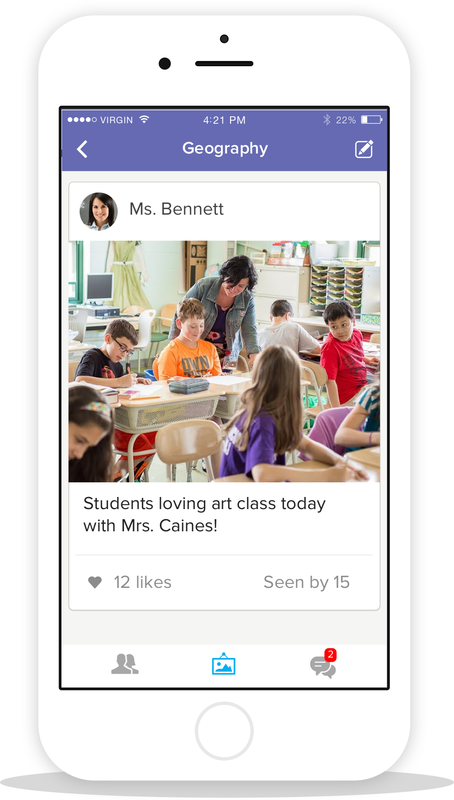
Class Story is another way for teachers to keep parents in the loop. It lets parents see their child's progress anytime, anywhere. It extends the current messaging feature and helps parents engage quickly and easily with your class. It makes sharing class news and photos a breeze, and with read receipts teachers can see when parents have read their Class Story posts, so they always know the messages are getting through.

How does it work?
Teachers can post photos and text to their Class Story in a similar way as we use social media 'walls.' These posts are shared with all connected parents automatically and parents can even 'like' them. However, unlike public websites or social media sites, this means that only the parents connected with your class are able to view the information you choose to share. This is a big plus because safety and privacy online is a big concern for many schools.

Of course you can still access the messaging feature to send out group and individual messages as well!
Picture
How can I access it?
Class Story will be accessible through the ClassDojo app on any iOS or Android device and through the website on any computer, however, remember that it is still currently in the beta phase, so it's not fully available to all users just yet - hopefully by the end of the month!


Class Story is just another example of the fantastic and dedicated Dojo team listening to feedback and giving teachers features that are useful, practical, engaging, and fun! I love being able to keep parents in the loop quickly and easily, plus it's great to see how they engage with what I'm sharing, so I'm keen to test and discover all that Class Story has to offer!

For more information about Class Story, or to sign up as a beta tester, check out www.classdojo.com/ClassStory.

Picture
3 Comments
Stefanie
6/8/2015 04:30:43 am

Reply
startups link
16/10/2016 03:50:20 pm

Libraries are not only great places to go for information and good reads, but also a place that encourages innovation. Each day at lunch, we’ll offer a different activity in the media center.

Reply
Edirne baymak servisi link
4/8/2022 07:45:23 pm

Edirne baymak servisi için hemen websitemize göz at! https://www.edirneklimaservisi.com/edirne-baymak-servisi/

Reply


Leave a Reply.

    Picture
    Picture

    Author

    ​​Welcome! I'm Meagan Caesar, a high school English and Humanities teacher in Queensland, Australia and I've designed this site for teachers interested in using more technology in their classrooms. 
    ​

    I don't represent any of the companies listed in any way, nor do I make any guarantees for the effect of these resources in your classroom. I simply want to share my experiences, ideas, resources, and information in the hopes that you will find some of these technologies useful, engaging, and rewarding.


    Make sure you keep popping back because I try to keep the blog updated regularly and add new info, resources, and technologies as I discover and test them in my classroom.

    Follow ME

    Click here to visit and like my facebook page to see my posts in your news feed, or follow the RSS feed below.

    RSS Feed


    Picture

    my TPT

    Pre-K, Kindergarten, First, Second, Third, Fourth, Fifth, Sixth, Seventh, Eighth, Ninth - TeachersPayTeachers.com

    Site Survey!

    Picture
    Let me know what you think of the site by filling out the short survey here. Your feedback is greatly appreciated!

    Blog Categories

    All
    2015
    2016
    ClassDojo
    General
    New Features
    New Tools
    Old Tools
    Teacher Life
    Tech Reviews
    Welcome

    Blog Archives

    December 2017
    June 2016
    February 2016
    January 2016
    December 2015
    August 2015
    July 2015

Powered by Create your own unique website with customizable templates.
  • Home
    • Teaching Philosophy
    • Contact Me
  • My TPT Store
  • ClassDojo
  • Remind
  • Plickers
  • Socrative
  • eLearn
  • Google Calendar
  • More!
    • iPad Apps
    • Useful Websites
    • OneNote
    • Planbook
    • Doceri
    • Weebly
    • Quizlet
    • PowToon
    • EduCanon